

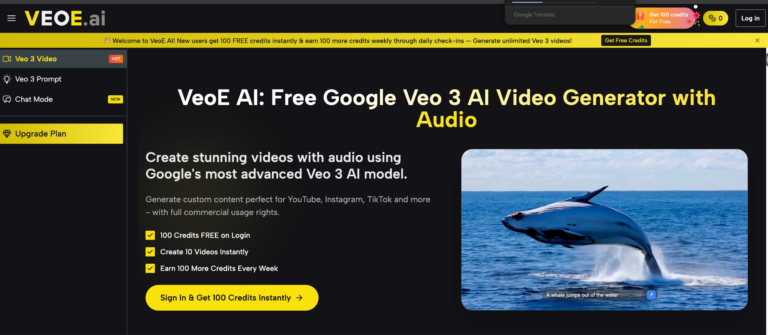
Google’s Veo 3 is widely regarded as one of the most advanced video generation models ever built — capable of producing cinematic-quality footage with natively synchronized audio, realistic physics, and detailed scene composition. Until recently, access came with a steep price tag.
That’s changed. Veo 3 via VeoE AI gives any creator — regardless of budget — direct access to Google’s Veo 3 API with no upfront cost, no subscription wall, and no software to install. VeoE AI is the fastest way to go from a text idea to a publish-ready video with audio in 2026 — and it’s built entirely around making Google’s most powerful model accessible to everyone.
Table of Contents
Why Creators Are Switching to AI-Powered Video Generation
Traditional video production remains slow, expensive, and technically demanding. Even for experienced creators, a single polished video can require hours of scripting, filming, editing, and audio mixing. For small teams or solo marketers, that cost is simply unsustainable.
AI video generation removes those barriers entirely:
- No filming required — Generate footage from a text description or a static image
- No audio editing — Synchronized voiceovers, ambient sound, and music are generated automatically
- No technical skills needed — The platform handles prompt optimization, composition, and rendering
- No expensive subscriptions — VeoE AI provides 100 free credits on sign-up and refreshes them weekly
The shift isn’t just about convenience — it’s about scale. A marketer who once produced two videos a month can now produce twenty, across multiple formats and platforms, without adding headcount.
Key Features of VeoE AI’s Free Veo 3 Generator
VeoE AI is built around Google’s Veo 3 API and delivers a complete, no-code video production experience. Here’s what makes it stand out:
1. Smart Prompt Generator — Write Less, Generate Better
One of the biggest frustrations with AI video tools is not knowing how to write a good prompt. VeoE AI solves this with a built-in Smart Prompt Generator that works automatically behind the scenes:
- Auto-optimization: Paste in a rough idea — even a single sentence — and the system expands and refines it into a Veo 3-optimized prompt with scene detail, motion description, lighting, and audio cues
- Prompt templates: Choose from curated prompt templates across categories (cinematic, product showcase, social media, etc.) to jumpstart your creation
- One-click enhancement: Already have a prompt you like? Hit Enhance and the AI upgrades it for higher output quality without changing your original intent
The result is consistently better video quality — even for users with zero prior experience in prompt engineering.
2. AI Video Agent Chat — Create Through Conversation
VeoE AI’s Chat Mode takes a fundamentally different approach to video creation. Instead of filling out a form or crafting a prompt from scratch, you simply have a conversation:
- Describe your idea naturally — Talk to the AI the way you’d brief a creative director: “I need a 10-second product ad for a skincare brand, warm tones, calm music, close-up shots”
- Iterative refinement — The AI asks follow-up questions to sharpen your concept before generating, reducing wasted credits on off-target outputs
- Multi-turn dialogue — Adjust the style, mood, or pacing mid-conversation; the AI remembers your previous inputs and builds on them
- Ideal for complex projects — When your concept involves multiple scenes, specific emotions, or layered audio, Chat Mode outperforms single-prompt generation every time
This makes VeoE AI genuinely accessible to non-technical users who think creatively but don’t speak “AI prompt language.”
3. Multi-Model Hub — More Than Just Veo 3
VeoE AI is not locked to a single model. The platform aggregates multiple leading AI video generation models in one place, giving you the flexibility to choose the right tool for each project:
- Google Veo 3 — Best for cinematic realism, synchronized native audio, and complex scene generation
- Additional models — Access other generation engines suited for different styles, speeds, and creative requirements — all from the same dashboard
- Side-by-side experimentation — Run the same prompt through different models and compare outputs before downloading
- One account, one workflow — No need to manage separate subscriptions or logins across multiple platforms; everything is unified under your VeoE AI account
This multi-model approach future-proofs your workflow — as new models launch, VeoE AI integrates them directly into the same interface you already know.
How to Create Your First Video on VeoE AI
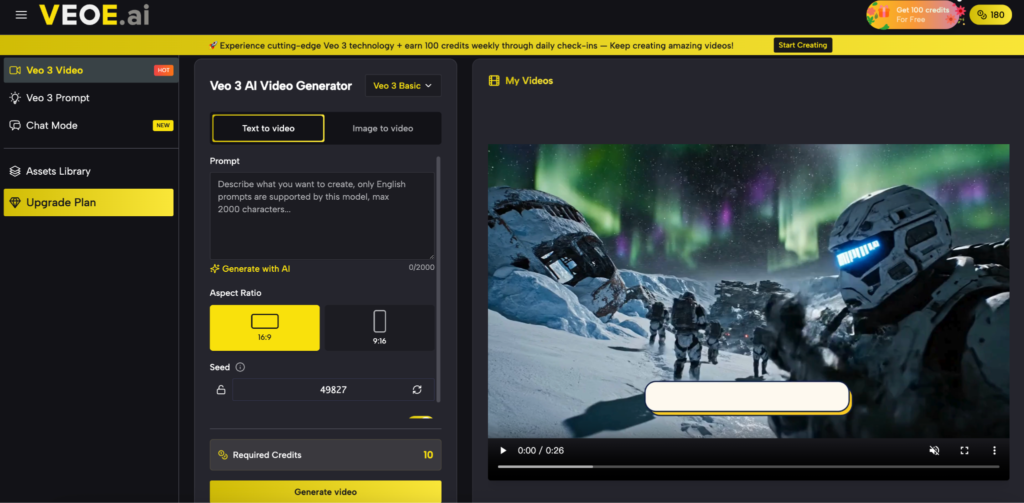
Step 1 — Choose Your Creation Mode
Visit Veo 3 and select how you want to create:
- Text to Video for prompt-based generation
- Image to Video to animate an existing photo
- Chat Mode for a conversational, guided approach
Step 2 — Enter Your Idea and Optimize
Type your scene description or upload your image. Click Enhance Prompt to let the Smart Prompt Generator refine your input automatically — this single step significantly improves output quality.
Step 3 — Generate, Download & Publish
Hit Generate. Veo 3 processes your request and returns a complete video with synchronized audio in moments. Download in high resolution with full commercial usage rights — ready to publish directly to YouTube, TikTok, Instagram Reels, or any platform of your choice.
Who Should Use VeoE AI?
VeoE AI’s tool set spans a wide range of real-world use cases:
- Social media creators produce short-form content for TikTok, Reels, and YouTube Shorts
- Marketing teams generating product videos, ad variations, and campaign content at scale
- Educators converting lesson material into visual explainers and instructional clips
- Filmmakers and storytellers prototyping scene concepts or generating b-roll footage
- Small business owners creating professional promotional videos without hiring a production team
- Corporate teams enhancing internal communications and presentations with video
The platform’s free credit model means even casual or occasional users can produce professional-grade content without committing to a paid plan.
How VeoE AI Compares to Other Veo 3 Platforms
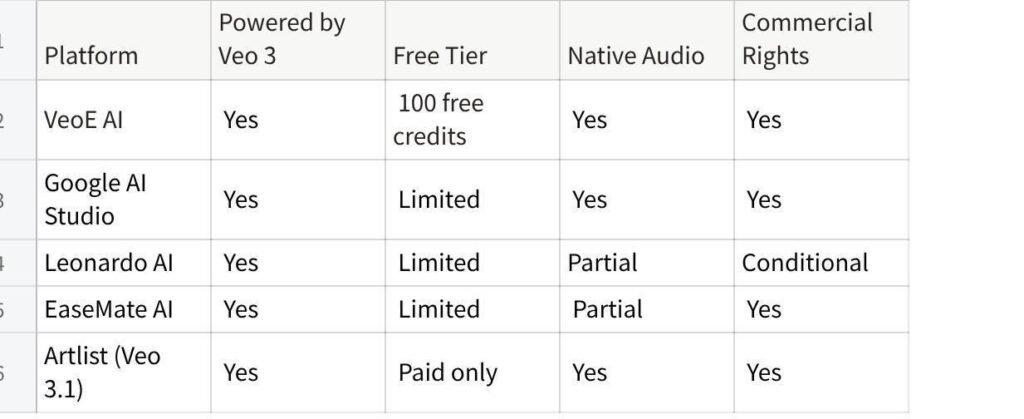
点击图片可查看完整电子表格
VeoE AI’s strongest advantage is combining a genuinely free entry point — with weekly credit replenishment — alongside native audio, commercial rights, and a no-signup generation option. Most alternatives require either a paid plan or a full platform account before you can generate a single clip.
Start Creating
The cost and complexity barrier for professional video production has effectively disappeared. Whether you need one polished clip for a product launch or a steady stream of social content throughout the month, VeoE AI gives you the tools to produce it — powered by Google’s best model, at no cost to start.
If you’re ready to see what Veo 3 can actually do with your ideas, start your first video now with Free Veo 3 — no credit card, no download, no waiting.


