

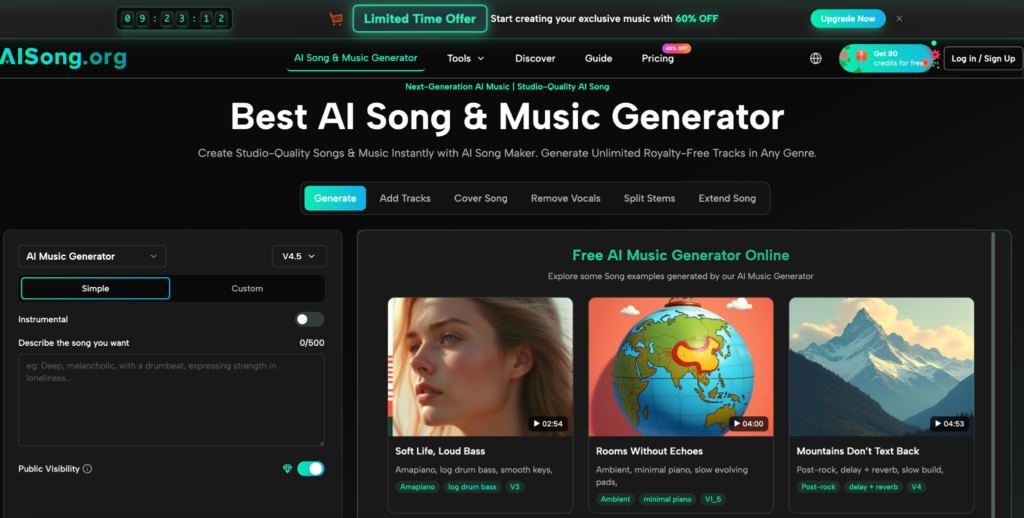
Getting a clean instrumental version of a song used to require one thing that most people don’t have: the original multitrack session files. Without them, you were left running a finished stereo mix through phase-cancellation tricks that produced hollow, artifact-ridden results — technically usable for nothing serious.
AI has changed that. AISong’s Remove Vocals feature uses a neural network trained on millions of recordings to separate vocals from instrumentals with 98% accuracy — delivering two broadcast-ready audio files from a single source track, in under 60 seconds, directly inside the AI Song Generator platform.
Table of Contents
What Is the Remove Vocals Feature?
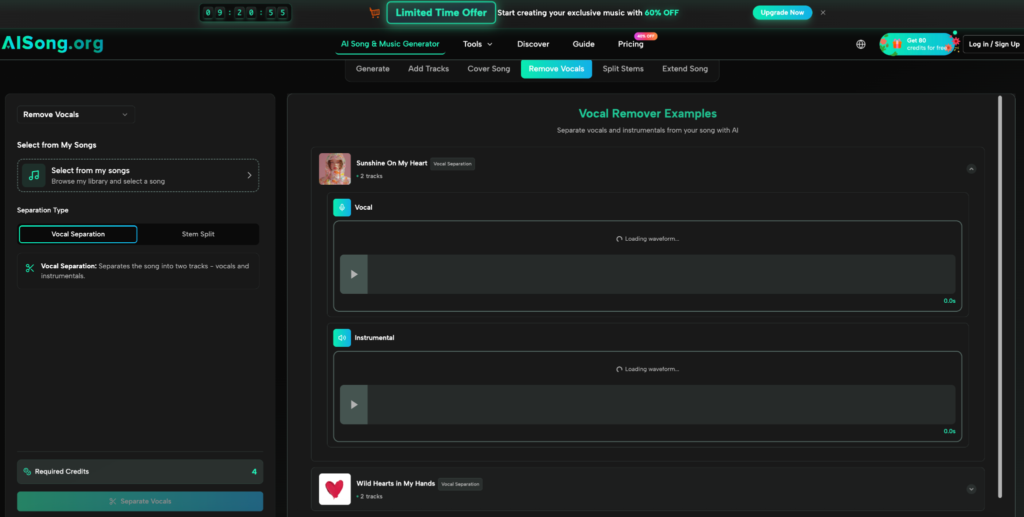
Remove Vocals is an AI-powered audio separation tool built into the AISong production suite. It takes any track from your music library and separates it into two distinct, independently downloadable outputs:
- Isolated Vocals (A Cappella) — the vocal performance extracted cleanly, ready for sampling, remixing, or vocal analysis
- Pure Instrumental (Backing Track) — the full musical arrangement with vocals removed, ready for karaoke, live performance, or further production work
Both outputs are maintained at 44.1kHz high-fidelity audio with no compression artifacts introduced during separation. Paid subscribers receive both files in lossless WAV format. The entire process completes in 15 to 60 seconds depending on track length and complexity.
How to Remove Vocals in 3 Steps
Step 1 — Select Your Track
Open the Remove Vocals tool from the main navigation inside AI Song. Your music library loads automatically — all tracks you’ve generated on the platform are immediately available for processing without any file upload or format conversion required. Browse and select the track you want to separate.
Step 2 — AI Separation Processing
Click Remove Vocals and allow 15 to 60 seconds for processing. The neural network scans frequency spectrum, stereo positioning, and temporal patterns to map vocal and instrumental elements with surgical precision. It handles harmonies, backing vocals, and layered productions without degrading the quality of either output. Both separated tracks undergo automatic quality optimization before delivery.
Step 3 — Preview, Download, and Use
Listen to both the isolated vocal and the pure instrumental in the built-in preview player before downloading. Download each file separately in MP3 (all users) or lossless WAV (paid subscribers). Both output files carry full commercial usage rights and are immediately ready for use in any project.
More Tools Inside AISong
Remove Vocals is one part of a complete nine-function production suite. The other tools inside the platform cover every stage of the music creation workflow.
Create — From Idea to Finished Song
- AI Music Generator: converts text prompts or lyrics into complete professionally mixed tracks across 30+ genres, with full commercial rights on every output
- AI Lyrics Generator: produces structured verse-chorus-bridge lyrics from any topic, keyword, or emotion — multiple versions generated simultaneously for comparison
- Text / Lyrics to Music: turns any existing text — a poem, brand message, or personal story — into a finished song with original melody, arrangement, and vocals
Separate — Vocals, Instrumentals, and Stems
- Stem Splitter: goes further than Remove Vocals by breaking any track into 4 to 12 individual stems (drums, bass, guitar, keys, strings) for full DAW-compatible post-production control
Layer — Build Songs From What You Already Have
- Add Tracks: add AI vocals to an existing instrumental, or generate a backing arrangement around an existing vocal —the Audio Weight slider controls how tightly the new layer follows the source
Extend and Transform — Finish, Reshape, and Deliver
- AI Song Cover: transforms any track into an alternate vocal version using genre-specialized voices including pop, rock, R&B, and country
- Extend Song: adds seamless new material at any chosen timestamp using a visual waveform editor, matching the original key, tempo, and energy
- MP3 to WAV Converter: converts any track to lossless 44.1kHz WAV for professional studio, broadcast, and commercial distribution use

How These Tools Work Together
The real value of AISong is not any single feature — it’s how each tool connects into a continuous creative workflow that takes a project from first idea to finished, commercially licensed output without switching platforms.
- Start with the AI Music Generator or Text to Music to produce a base track from a prompt or existing lyrics
- Use Add Tracks to layer vocals onto an instrumental, or build an arrangement around a recorded vocal
- Run the result through Remove Vocals to create a clean karaoke version or isolate the vocal stem for sampling
- Pass the instrumental into Stem Splitter for full multi-track control when the project requires deeper production work
- Use Extend Song to hit an exact video duration or complete a track that needs additional sections
- Apply AI Song Cover to explore alternate vocal directions before committing to a final version
- Export everything in lossless WAV when the track is ready for professional delivery or commercial distribution
Each tool feeds into the next, which means a project can move from blank page to finished song entirely within AISong — no extra subscriptions, no file re-uploading, no platform switching required.
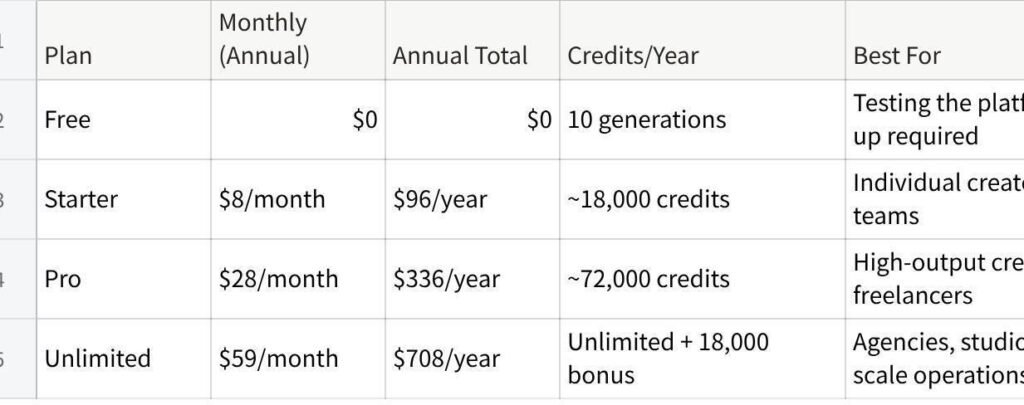
AISong Pricing

点击图片可查看完整电子表格
All paid plans include full commercial rights, WAV downloads, access to all 9 production tools, and no watermarks. Full pricing details at aisong.org/pricing.
Conclusion
Remove Vocals eliminates one of the most persistent friction points in music production: the inability to get a clean instrumental or isolated vocal without original session files. Whether you’re building karaoke tracks, sourcing clean stems for a remix, coaching vocal performance, or creating background music for video content — the tool delivers professional-quality results in under a minute.
As part of AISong’s complete production suite, it connects directly into the rest of the workflow. Generate a track, separate the vocals, extend the instrumental, or feed the output into Stem Splitter for full multi-track control — all without leaving the platform.
Try the Remove Vocals tool free at aisong.org — no sign-up required to get started.